
AI Manager That Runs Your Business Day to Day
By Yuntao Zou, Founder, VentiMap@TaoMachina
VentiMap is an AI manager that runs your business day to day: on a paid pass, its Manager reviews the company against its own numbers every day, plans the next jobs, runs them and tells you in the chat. You see each job on a task list and can start it now or skip it.
I wanted a Manager that looks at the company itself, decides what comes next and shows me the list, so the company keeps moving on the days I am busy.
An AI business manager, in VentiMap's sense, follows your company, plans its next jobs and does them, and you can see it and stop it at any point.
How does the Manager decide what to do next?
Every day, once your company is running on a paid pass, VentiMap reads how it is doing: site visitors, checkouts, sales, outreach emails sent and replies. It first measures what the earlier jobs did to the number each one named. Then it plans up to three next jobs, each tied to real figures from your company.
The jobs the Manager runs on its own appear as rows in the Tasks card of your Control Panel, in plain words. You do not have to press anything: the Manager starts a job when it is due. Start is there for when you want one now.
The Manager also follows the project as it goes. It posts a line in your chat for each change, such as a new image, an X post or a finished job, so the daily list sits inside a company you can already follow.
Which jobs does the Manager run on its own?
Three kinds of job run from the list. Each one runs through the same pass, Credits and consent checks as when you do the job yourself.
- A post on X. The Manager writes it from your company's facts and posts it on the company's own connected X account, at X's list price from your Credits. If X is not connected, the Manager says so and the post waits.
- A rewrite of your outreach letter. It runs while the letter is open for a change. The new draft is checked before it is stored, and if it does not pass, your current letter stays as it is.
- A price change. The new price has to sit inside the range your own report researched, meaning its price and the comparison prices it cites. At most one price change runs per daily plan, and if the price moved since the job was planned, the job is set aside.
When a price job finishes, the Manager says what changed, with the old price and the new one, in a line such as “I changed your price from $29.00 to $24.00.”
What do I see, and how do I stay in control?
Every job is a row with a state: Next, Working on it, Done or Skipped. A row that has not started shows Start and Skip beside it. Start runs it now. Skip drops it. One job runs per company at a time, and if another is running, the row says this one starts after it.
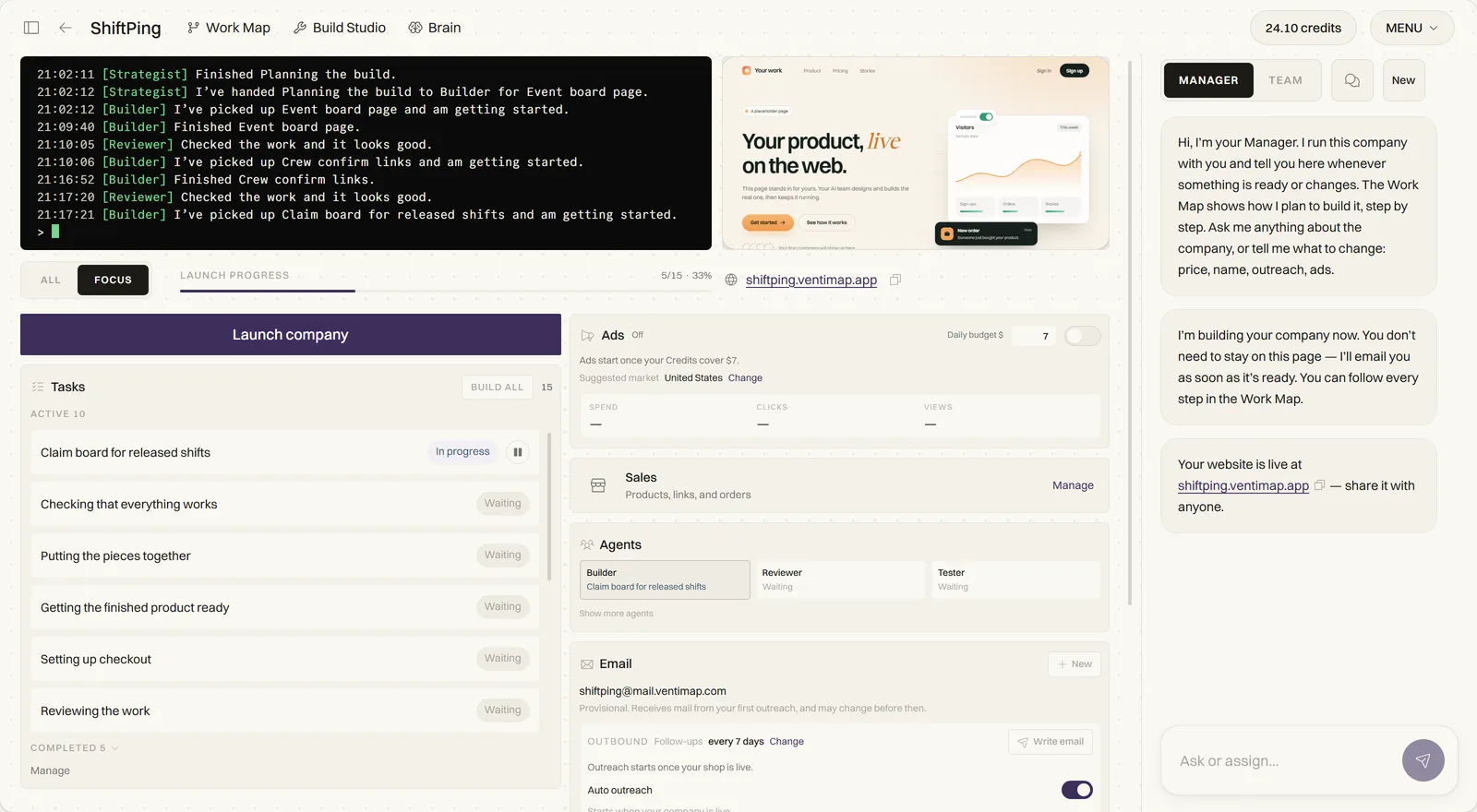
A finished row can carry the number the job was meant to move, written as plain digits, for example “Visitors: 12 before, 20 now.” It gives no verdict and no cause; it is the figure before and after, so you can judge the job yourself.
You can also pause the company. While it is paused nothing from the list runs, and the Manager tells you the job will start when you resume. I wrote about the rest of the controls in how to stay in control of an AI-run business.
What does the Manager tell me while it works?
It posts a line in your chat when the work really begins and another when it is done. The start line is not posted when a job is planned, only once the work has started, so it is never a promise. For example:
- “I'm writing your next post for X. I'll share the link here when it's live.”
- “I'm updating your price. I'll tell you here when the new price is live.”
When a job has to wait, it says so once, in plain words, with no technical cause. If you have no outreach letter yet, you read: “Your outreach update is waiting for your first outreach email. I'll try again within the hour.” If a job it has already announced turns out not to be needed, because the price moved in the meantime, you read: “I didn't change your price after all, so it stays as it is.”
Does the Manager answer my customers' emails?
Your Manager answers customers' emails for you, from your company's own details, and tells you in the chat. It uses your report, your active offer with its one price and your published site, and it sends one automatic reply per thread until you reply. It respects opt-outs. Each answer is paid from your Credits at a measured cost.
Questions about discounts, refunds or anything it shouldn't decide wait for you. The same goes for custom deals, billing problems, legal terms, a meeting, a call or a demo, an objection, an account or order change, and anything your company's details do not answer. The exchange sits on the Email card, and the Manager posts a line in the chat.
Does the Manager email me about the next job?
Yes, in the daily company email. For a company that is operating, it says what happened yesterday: site visitors, emails sent, replies and sales. It says where visitors stopped, in one plain sentence taken from the numbers, and it names the next job, in the form “Next, your Manager will: …”, with a line that anything planned can be skipped from your Control Panel.
You get at most one email a day, and a quiet day sends nothing. It comes by default, and you can switch it off in your notification settings. I describe the email in my post on how to run an online business from your phone.
Which plans include the daily task list?
The daily task list is part of the paid passes. A pass is one-time, lasts 30 days, starts at $20 and never renews on its own. Posts on X cost X's list price from your Credits, and the daily review is paid from your Credits at a measured cost. The pricing page has the passes side by side.
To see the kind of company this runs, the companies page lists real operating companies built on VentiMap, with links to their sites.
What happens after a launch is the stretch this list is for. I wrote down the whole picture in what happens after you launch an AI-built product.
What else do people ask about an AI that runs a business?
What is an AI business manager?
An AI business manager follows your company, decides what should happen next and does it. In VentiMap, the Manager reviews your company's own numbers every day on a paid pass, plans up to three jobs, runs an X post, an outreach-letter rewrite or a price change on its own, and posts a line in your chat when work begins and when it is done.
Can an AI find tasks for my business without me asking?
Yes, on a paid pass. Every day VentiMap reads how your company is doing and plans the next jobs, each tied to real figures. They appear in the Tasks card, and the Manager starts them when due. You can press Start to run one now or Skip to drop it.
Which jobs does the Manager do by itself?
Three: a post on your company's own X account, a rewrite of your outreach letter, and a price change inside the price range your own report researched. Each runs through the same pass, Credits and consent checks as when you do it yourself.
Can I stop the Manager from doing a job?
Yes. Press Skip on any job that has not started, or pause the company and nothing from the list runs until you resume. The Manager says in the chat when a job begins, when it is done and when it is waiting.