
How to See What AI Agents Are Doing in Your Business
By Yuntao Zou, Founder, VentiMap@TaoMachina
Ask to see the plan, not only the results. In most AI business builders, you learn what the agents did from a chat thread, an activity feed or an email afterward. VentiMap draws the plan as a Work Map: every step the agents will take, how the steps depend on each other, and where each one is right now. You can read it before anything runs, open any step, and change the plan through revisions you approve.
A disclosure first. I'm the founder of VentiMap, and the Work Map is the part of it I care most about, so weigh what follows accordingly. Every statement about other products comes from their own public pages, read on October 13, 2026.
Why a feed is not enough
A feed is a list of things that already happened. It answers one question: what did the agents do? It does not answer the questions an owner asks next. What happens after this? What is waiting on what? If I change this part, what else moves? When several agents work at the same time, a list in time order hides which of their steps matter to each other.
That is the gap between watching the work and steering it. If you cannot see the plan, the only way to change it is to describe the change in a chat and hope the agents understood which part you meant.
What the Work Map shows
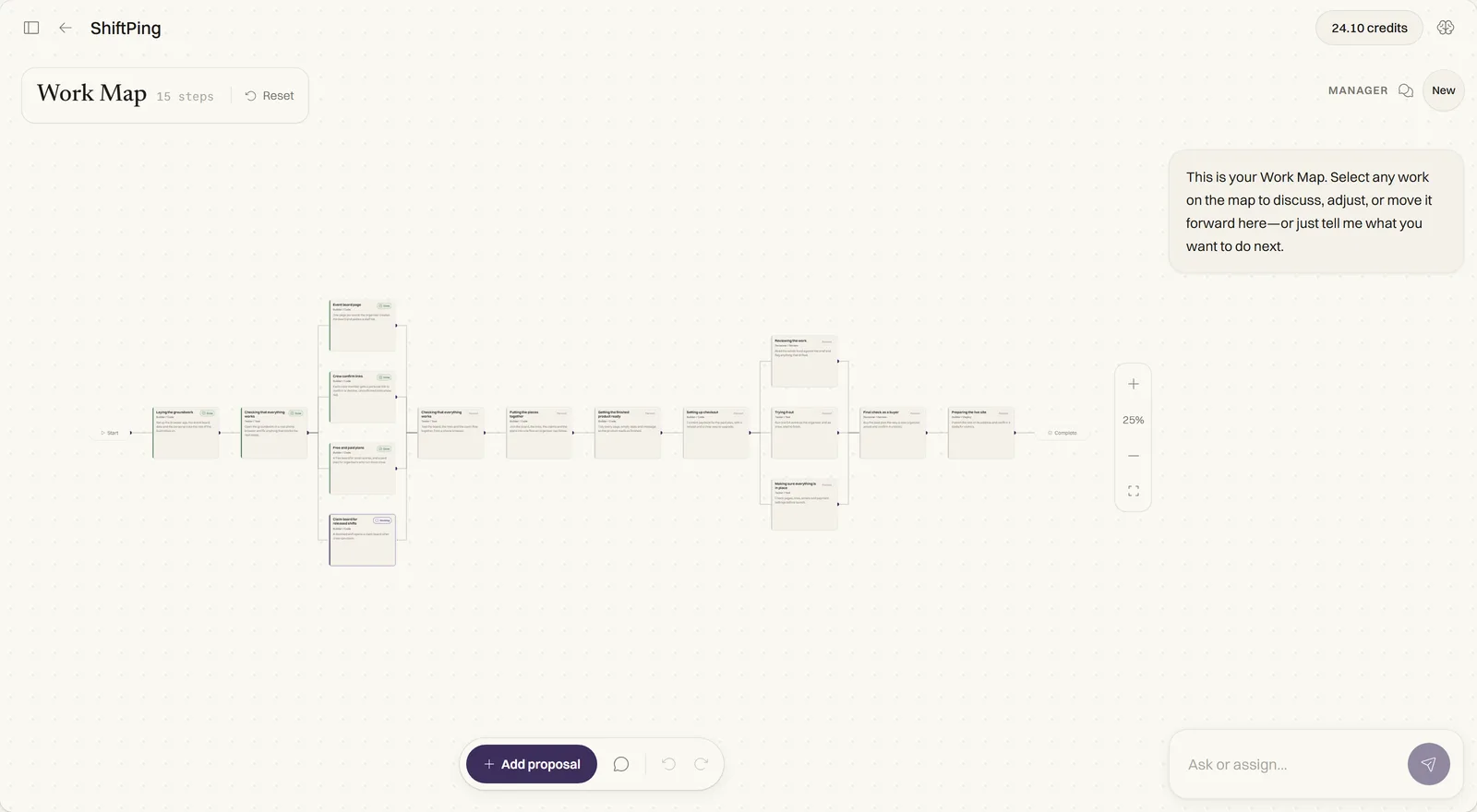
- Your company's tasks, and inside each one, the workstreams and steps that make it up. You open a level to go deeper and step back out the same way.
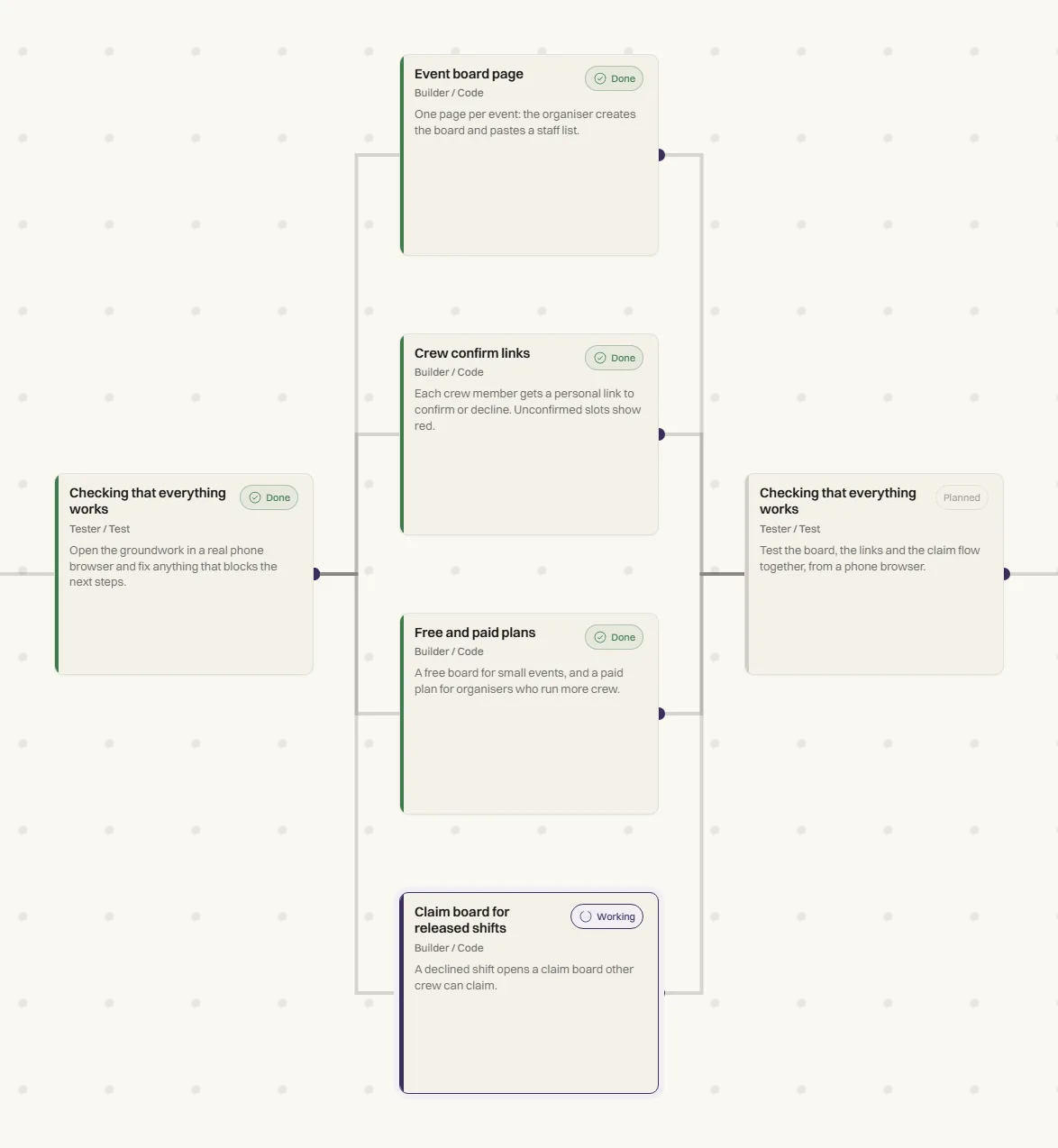
- Every step with its status: planned, working, awaiting confirmation, done, or set aside.
- The connections between steps, so you can see what a step is waiting for and what follows from it.
- The plan in waves: steps that run side by side, and checks between the waves. Nothing after a check starts until the check is done.
- For each step, which AI model does the work and roughly how many Credits it will use.
Opening one step
Click a step and the map narrows to the steps that lead into it and the ones that follow from it. From the step itself you can edit it before it runs, look inside it while it works, and run it again after it finishes. You can choose which AI model the step uses and see the estimated Credits before you save the choice. While a run is in progress those settings are locked, so the plan the agents are working from does not shift under them.
You can also select one or more steps and leave a comment on them, which is the plain way to say "this part, not that one".
Changing the plan without losing the old one
Most changes start as a sentence to the Manager, the agent you talk to. The Manager prepares the change as a proposal on the Work Map, so you can see where new steps would go and what they would connect to before anything is applied. You approve it, or decline it and the Work Map stays as it was.
An approved change is saved as a new version of the Work Map, and the earlier version stays in its history. A change that would create a loop, two steps each waiting for the other, is refused before it is saved. These are small rules, but they are what make a plan you can trust after the tenth change, not just the first.
How other AI business builders show the work
I read what each product says about this on its own pages. The table sums it up. Where a page did not mention something, I wrote "not described", which means I did not find it, not that it is missing.
| How you follow the work | The plan before agents act | Changing one step | |
|---|---|---|---|
| Polsia | A dashboard of every task, decision and output, plus a public live feed | Not described; it runs one task on your company each night | Not described |
| NanoCorp | Chat with one main agent, a daily digest, a task list and a public live feed | Partly: the first session only reads, then a digest says what the agent understood | Through chat; the agent tidies the task list |
| Cofounder.co | A roadmap in stages, with tasks marked for you or for an agent | Yes, as a roadmap; connections between tasks not described | Not described |
| Locus Founder | Text messages | Not described | Not described; you approve every spend |
| VentiMap | A Work Map of steps, their connections and status, plus the Control Panel | Yes: every step and what it waits for | Open the step, or approve a Manager proposal saved as a new version |
Some of them do things better than VentiMap. Locus Founder asks you to approve every spend, and Cofounder.co marks risky actions for approval, while VentiMap lets outreach run on its own after launch. NanoCorp's daily digest is quick to read. If you would rather read a short summary than look at a map, one of those may suit you better.
What still runs without you
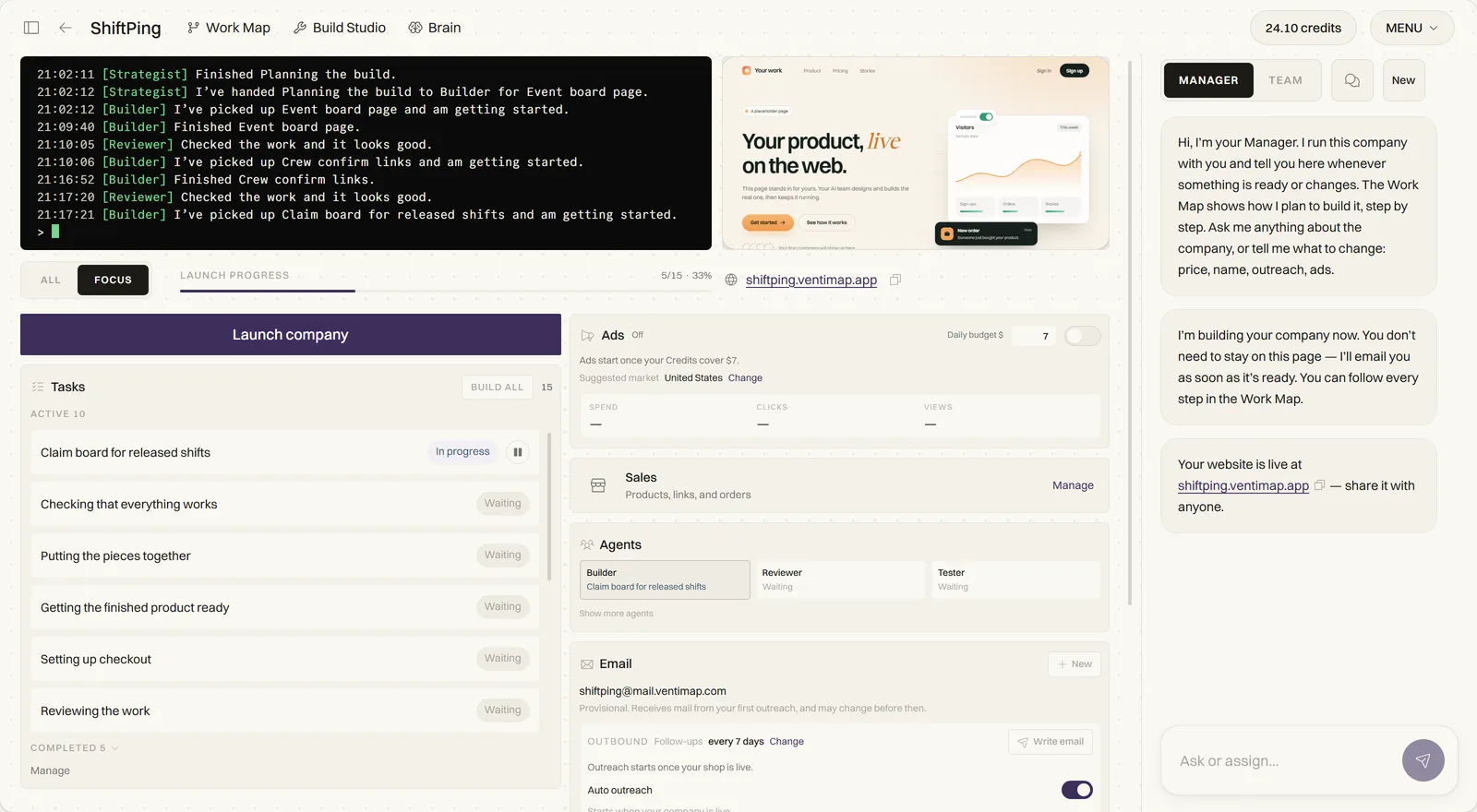
A map is not a request to approve every click. Outreach starts by itself when your company launches, sending a few emails a day, and you can edit the letter or turn outreach off at any time. Reddit ads wait until you approve a daily amount. Changes to the Work Map wait for your OK. The Control Panel adds an overview, recent activity and the numbers available so far, and the Manager tells you what happened in plain words. I wrote more about deciding what to keep for yourself in a separate post.
Questions to ask any AI business builder
- Can I see the plan before the agents act, or only the results after?
- Can I see what a step is waiting for, and what depends on it?
- Can I change one step without rewriting the whole plan in a chat?
- When the plan changes, is the earlier version kept?
- Can I see the estimated cost of a step before it runs?
- Which steps spend money, and which of those wait for my OK?
A few practical questions
What is a Work Map?
It is VentiMap's plan for your company, drawn as a map of steps and the connections between them. Each step shows its status, and you can open any step to see what leads into it, what follows from it, and what it will cost.
Do I have to watch the Work Map while the agents work?
No. The work continues while you are away, and the Manager tells you when something is ready or changes. The Work Map is there when you want to understand why something is happening or change what happens next.
Can I change the plan after the work has started?
Yes. Ask the Manager for the change and approve the proposal it prepares. The settings of a step are locked only while a run is in progress, so the agents never work from a plan that is changing under them.
Whichever product you choose, ask it to show you the plan. If the only answer is a list of what already happened, you are trusting the work rather than seeing it.